🍁 Autumn Sale — Up to 70% discount for hosting and domains🍁 Autumn Sale — Up to 70%
Activate now
Tutorials • DNS

Clear local DNS cache Windows

Learn how to clear the local DNS cache on Windows with simple steps to improve your system's performance.

4
Views 2090Updated 2 aniPublished on 26/01/2018by Florin P.

Introduction

  • In this tutorial, we will show you how you can delete the local DNS cache on Windows operating systems

Requirements 

Steps

  • Right-click on the Start menu, click Run, and here we will type cmd and press Enter or OK.
  • in cmd we will type ipconfig /flushdns and press Enter.
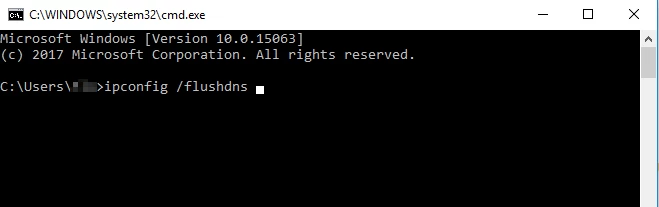
Accesare CMD ipconfig/flushdns

Similar Articles

Views 2,090
Updated 2 years ago

Learn how to clear the local DNS cache on Windows with simple steps to improve your system's performance.

Views 1,494
Updated 2 years ago

In this article we will present the necessary steps to delete a DNS zone using the WHM Delete DNS Zone function.

Views 7,315
Updated 5 years ago

Learn how to delete your history and cache in Google Chrome using the Ctrl+Shift+Delete key combination. The tutorial includes simple steps and applicability in other browsers.