Tutorials • WHM
Skeleton director (template for newly created accounts)
Learn how to create a default home page for new accounts in WHM, using cPanel and the file manager. Simple and efficient!
Views 1027Updated 2 aniPublished on 21/06/2018by Cătălin A.
Introduction
This tutorial explains the procedure for creating a default homepage that will be displayed when accessing a newly created account in the reseller's WHM in the browser.
Requirements
- a WHM account
Steps to Follow
- to create a default page that will be automatically inserted and displayed when accessing all newly created accounts under the reseller, you will need to access the cPanel of the main reseller account
- after entering cPanel, access the "File Manager"

- In the next window, access the "cpanel3-skel" folder structure and then "public_html" inside it
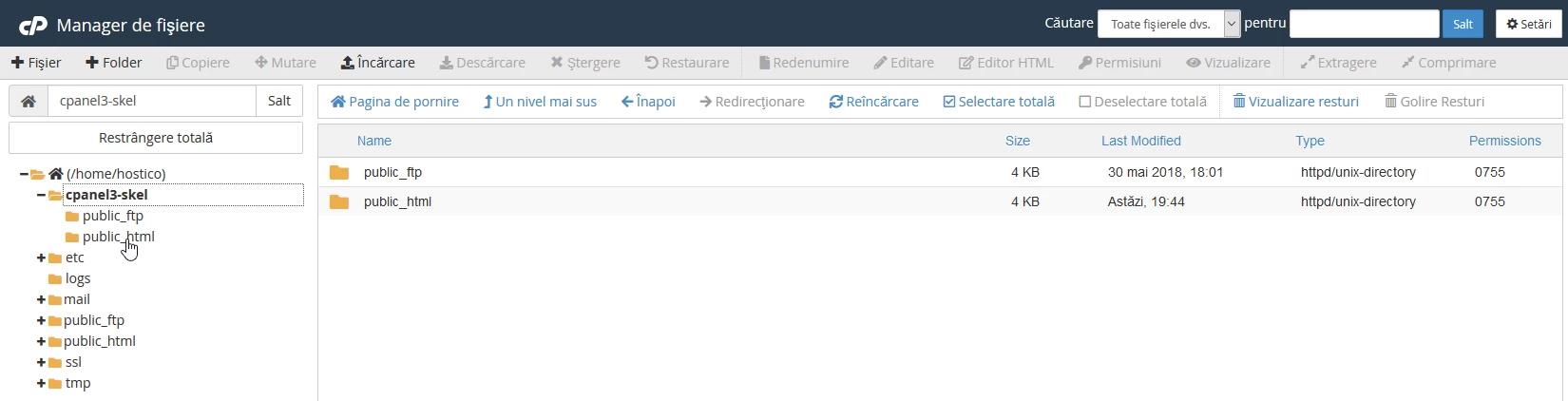
- Inside public_html, create a file named "index.html"


- after creating the file, it is edited by right-clicking on it and selecting "Edit"

- a confirmation window will appear in which you will need to click the "Edit" button

- a new window will open where a text message can be entered that will be displayed when accessing the domain or, if preferred, a customized page can be created, after which the "Save Changes" button is clicked

- in this way, any new account created under the reseller will automatically contain in its web directory this index.html with the predefined message.