Tutorials • Apps
Limiting the number of simultaneous connections in Filezilla
Find out how to limit the number of simultaneous connections in Filezilla to avoid firewall blocking. Follow the simple steps to adjust the settings.
Views 1193Updated 1 anPublished on 30/01/2018by Florin P.
Introduction
- In this tutorial, we will show you how to change the number of simultaneous connections in Filezilla.
- If you download or upload multiple files simultaneously through the FTP Client Filezilla, you risk being blocked by the server's firewall for simultaneous connections.
Requirements
- Filezilla
Steps
- Open Filezilla FTP, click on Edit and then Settings.

- In the new window that opens, go to Transfers.
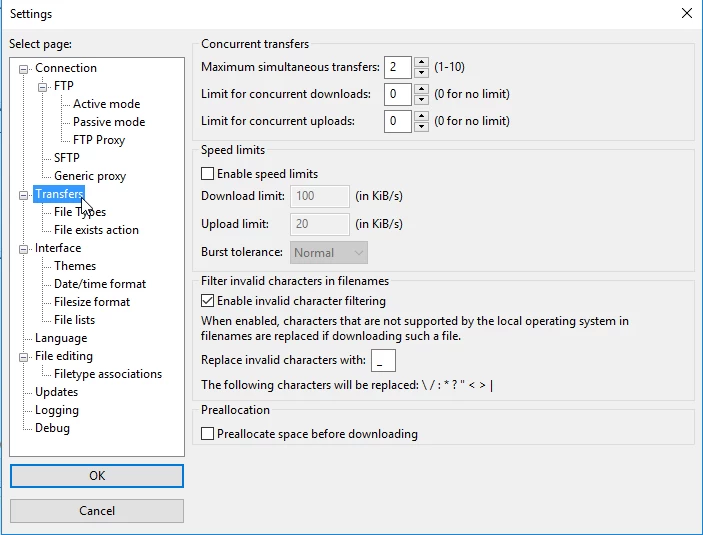
- And here we will modify the following values:
- Value of Maximum simultaneous transfers at 1.
- The value of Limit for concurrent downloads is 1.
- The value Limit for concurrent uploads is 1.
And then we will save the changes made by clicking the OK button.
