Tutorials • DNS
Resetting a DNS zone using WHM
Resetting a DNS zone in WHM is simple: log in, go to DNS Functions, select the zone, and confirm the reset to reinstall the default records.
1
Views 1487Updated 2 aniPublished on 26/09/2018by Sebastian S.
Introduction
- The DNS (Domain Name Service) converts human-readable domain names (e.g.: example.com) into computer-readable IP addresses (e.g.: 192.0.32.10). DNS relies on "DNS zones" that exist on the server to convert domain names to IP addresses.
- Resetting a DNS zone deletes all DNS records and recreates them with the default values, according to the template used in DNS Functions >> Edit Zone Templates. TXT records and subdomains will be preserved.
- WHM provides the ability to reset a DNS zone through the DNS Functions features.
Requirements
- WHM login details. These can be found in the email with the management details of the reseller account or the VPS with cPanel/WHM.
Steps
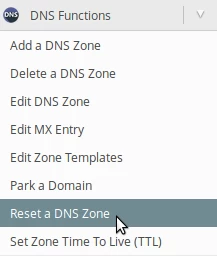
- After logging into the WHM panel on the left side of the page, we will go to the DNS Functions section and click on Reset a DNS Zone. Alternatively, we can search for this menu using the search field at the top.
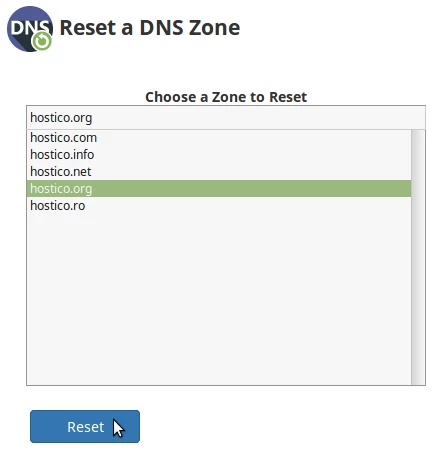
- On the next page, we will select the DNS zone that we want to reset and click on Reset.
- We will confirm again by clicking the Confirm button.

- If everything went smoothly, the new DNS zone will be displayed in a box below New Zone.