Remote MySQL Usage in cPanel
Learn how to use Remote MySQL in cPanel to connect applications to your website's database. Step-by-step guide for setup and management.
Introduction
This tutorial presents you with the option in cPanel for remotely connecting an application to your website's database from your hosting.
Requirements
Authentication data for the hosting package.
Steps
- You will first contact the hosting technical support for information regarding the permissions granted for this type of remote connection to the databases. Additional modifications may be needed on the server/account to connect.
- Then you will access the cPanel hosting panel, you will log in with the administration data (username/password) provided by Hostico, and after a successful login, you will go to the Databases section where we will click on Remote Mysql.

- The page that will open will display the categories:
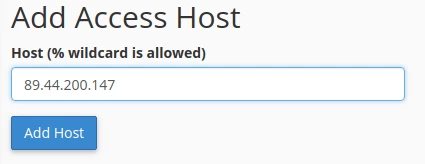
→ Add Access Host → the static IP of the ISP from which the database will be accessed remotely is added, and the “Add Host” button is pressed.
→ Manage Access Hosts → here will appear the IPs that are allowed remote access to the databases in your account, with an option to delete if the IP is no longer necessary for connection.
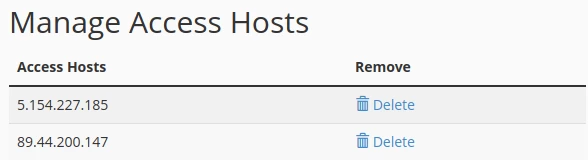
Note: This list may already automatically include, for backup purposes, the IP of the server where you have your hosting account, so it is recommended not to remove it to avoid disrupting the account's functionality.
After completing these steps, you will be able to remotely connect to the website's database from your account using dedicated programs for this purpose, with the connection being made from the static IP of your internet connection, the IP that you previously added according to the steps described above.