Frequently Asked Questions • Dev
I can't find the .htaccess file using the FileZilla FTP client. How can this be resolved?
Can't find the .htaccess file in FileZilla? Enabling the "Force Showing Hidden Files" option from the Servers menu will help you view hidden files.
Views 1154Updated 5 aniPublished on 10/09/2018by Sebastian S.
There may be cases where, when listing files through an FTP client such as FileZilla, the .htaccess file or other hidden files (with a dot in front) do not appear.
The problem is most often caused by the FTP client's settings not allowing the visualization of this type of file.
- To activate the listing of hidden files, click on Servers from the options bar in FileZilla, then check the Force Showing Hidden Files option.
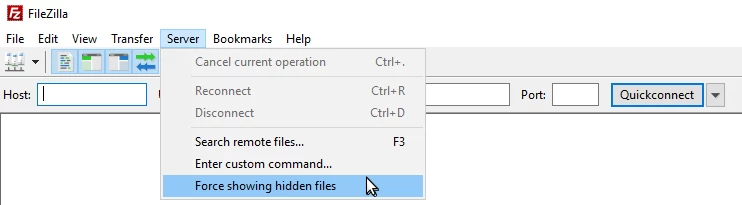
- If we receive a warning message from the application, we will click the ok button.
- After saving, all hidden files, including .htaccess, will become visible and editable.