Tutorials • Commercial
Activating SMS Notifications.
Presentation of the steps to be followed in order to activate SMS notifications on the Hostico client account.
Views 1202Updated 2 aniPublished on 04/05/2019by Mark D.
Introduction
In this tutorial, we will go through the necessary steps to activate SMS notifications.
Requirements
- Hostico client account
- Active phone number
Steps
- Activating SMS notifications can be done as follows:
- For existing accounts, this can be done from the Client administration panel.
- Navigate to the User, on the left side of the page.
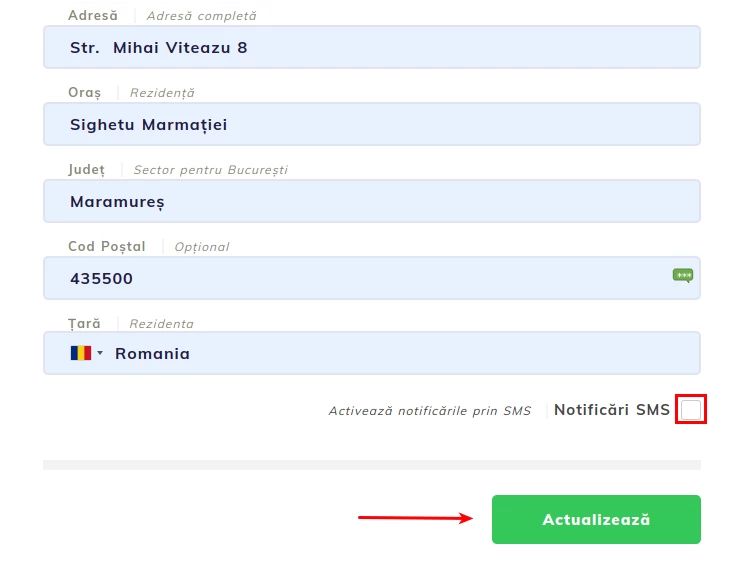
- In the opened page, navigate to the bottom, where you will check the box SMS Notifications.
- For the change to take place successfully, it is necessary to complete the procedure by pressing the Update button.
Note
- Currently, the received messages contain information related to the generation of a proforma invoice or the suspension of hosting services. In the future, if there is a demand in this regard, we will consider implementing other types of messages.
- By default, all existing accounts have SMS sending disabled, but at any time it is possible to activate them.
- This service is strictly used for notifying clients about the status of invoices and is not intended for mutual communication between Hostico and the Client. Information communication is done through one of the channels presented on the Contact page.
- There is no limit on the number of SMS messages sent for a single client account. Of course, this may be subject to changes in case this service is abused.
- SMS messages will be sent between 09:00 and 19:00, any message sent after 19:00 will be delivered the next day.